Invoice Type
Invoice Type allows you to define multiple invoice layouts, content and messages though Invoice Print Parameters. The default Invoice Type will be used during Print Invoices unless another Invoice Type is selected.
Navigate To: System>Configuration>Code Maintenance>Accounting>Invoice Print Parameters
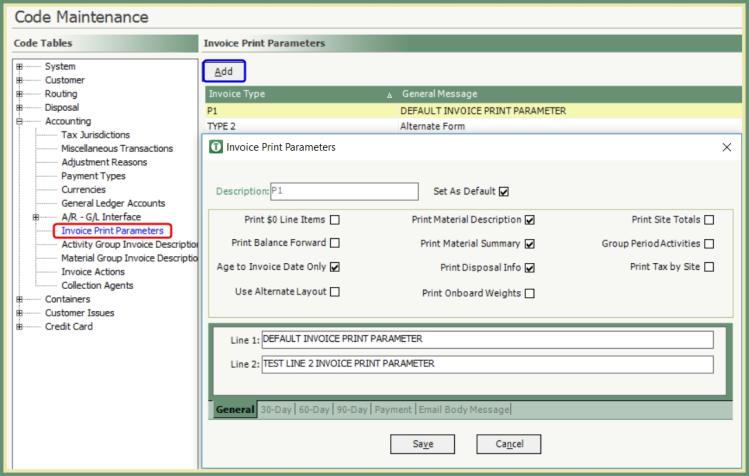
- Click Add.
- Enter an Invoice Type description.
- Check the box Set As Default f you woiuld like this to be the Default Invoice Type, .
- Check the boxes for the content to be included.
- Use Alternate Layout is selected when using a custom pre-printed invoice form or when a second invoice form is used.
- Enter General Messages to be printed on the invoice.
- Enter a message by outstanding balance category, select the 30, 60 and 90-Day tabs and enter the messages.
- Customers with an outstanding balance in these categories will receive their respective messages instead of the General Message.
- If you are Emailing invoices, you can enter an Email Body Message to be included with the emailed invoice.
- Save and repeat for any additional Invoice Types to be created.
TRUX Route Management Systems Inc. • Sales 866.879.8789 • Support 877.216.8789 • [email protected]
Copyright 2018 © TRUX All rights reserved.